1.Jsx 转换
我们知道,babel 在编译 react jsx 语法时,将 jsx 语法编译成了
//编译前
ReactDOM.render(
  <App />,
  document.getElementById('root')
);
//编译后
ReactDOM.render(React.createElement(App, null), document.getElementById('root'));
可以看到,,jsx 就是为了 React.createElement(component, props, …children) 方法提供的语法糖
2.createElement
我们具体看一下 createElement 做了什么
export function createElement(type, config, children) {
  let propName;

  // Reserved names are extracted
  const props = {};

  let key = null;
  let ref = null;
  let self = null;
  let source = null;

  if (config != null) {
    // 赋值特殊的属性: ref和key
    if (hasValidRef(config)) {
      ref = config.ref;
    }
    if (hasValidKey(config)) {
      // react dom diff  加上这个 key
      key = '' + config.key;
    }

    self = config.__self === undefined ? null : config.__self;
    source = config.__source === undefined ? null : config.__source;
    // Remaining properties are added to a new props object
    for (propName in config) {
      // 过滤掉特殊节点
      if (
        hasOwnProperty.call(config, propName) &&
        !RESERVED_PROPS.hasOwnProperty(propName)
      ) {
        props[propName] = config[propName];
      }
    }
  }

  // Children can be more than one argument, and those are transferred onto
  // the newly allocated props object.
  // 子节点个数,去除掉前两位
  const childrenLength = arguments.length - 2;
  //如果只有一个元素,截止赋值给props.children
  //如果有多个元素,将子元素数组赋值给props.children
  if (childrenLength === 1) {
    props.children = children;
  } else if (childrenLength > 1) {
    const childArray = Array(childrenLength);
    for (let i = 0; i < childrenLength; i++) {
      childArray[i] = arguments[i + 2];
    }
    if (__DEV__) {
      if (Object.freeze) {
        // 不能添加,不能删除,不能修改
        Object.freeze(childArray);
      }
    }
    props.children = childArray;
  }

  // Resolve default props
  if (type && type.defaultProps) {
    const defaultProps = type.defaultProps;
    for (propName in defaultProps) {
      if (props[propName] === undefined) {
        props[propName] = defaultProps[propName];
      }
    }
  }
  if (__DEV__) {
    if (key || ref) {
      const displayName =
        typeof type === 'function'
          ? type.displayName || type.name || 'Unknown'
          : type;
      if (key) {
        defineKeyPropWarningGetter(props, displayName);
      }
      if (ref) {
        defineRefPropWarningGetter(props, displayName);
      }
    }
  }
  // 返回一个react element
  return ReactElement(
    type,
    key,
    ref,
    self,
    source,
    ReactCurrentOwner.current,
    props,
  );
}
我们可以看到,createElement 方法处理 props,将子元素进行处理,返回一个 ReactElement 函数,我们再看 ReactElement 做了什么
const ReactElement = function(type, key, ref, self, source, owner, props) {
  const element = {
    // 用来表明这是一个react Element
    // 为啥需要$$typeof
    // $$typeof 为啥要是Symbol
    // This tag allows us to uniquely identify this as a React Element
    $$typeof: REACT_ELEMENT_TYPE,

    // Built-in properties that belong on the element  div, span, MyChild
    type: type,
    key: key,
    ref: ref,
    props: props,

    // Record the component responsible for creating this element.
    _owner: owner,
  };

  if (__DEV__) {
    // The validation flag is currently mutative. We put it on
    // an external backing store so that we can freeze the whole object.
    // This can be replaced with a WeakMap once they are implemented in
    // commonly used development environments.
    element._store = {};

    // To make comparing ReactElements easier for testing purposes, we make
    // the validation flag non-enumerable (where possible, which should
    // include every environment we run tests in), so the test framework
    // ignores it.
    Object.defineProperty(element._store, 'validated', {
      configurable: false,
      enumerable: false,
      writable: true,
      value: false,
    });
    // self and source are DEV only properties.
    Object.defineProperty(element, '_self', {
      configurable: false,
      enumerable: false,
      writable: false,
      value: self,
    });
    // Two elements created in two different places should be considered
    // equal for testing purposes and therefore we hide it from enumeration.
    Object.defineProperty(element, '_source', {
      configurable: false,
      enumerable: false,
      writable: false,
      value: source,
    });
    if (Object.freeze) {
      Object.freeze(element.props);
      Object.freeze(element);
    }
  }

  return element;
};
解释一下上面的属性及目的
- $typeof: REACT_ELEMENT_TYPE, //设置组件类型,如果浏览器不支持 Symbol,那么将使用位运算,来获当前使用了那些组件类型,这样做可以防止 xss,csrf 攻击,防止 element 被串改
- type: type, //element 类型
- key: key, //key dom diff
- ef: ref, //ref dom
- props: props, //属性
- _owner: owner, //元素自身
React.Children
在上面,我们看到了处理 props.children 方法,children 是一个类似数组但又不是数组的数据结构,对其进行处理时可用 React.Children 方法,接下来,我们看看 React.Children 做了什么
附上神图
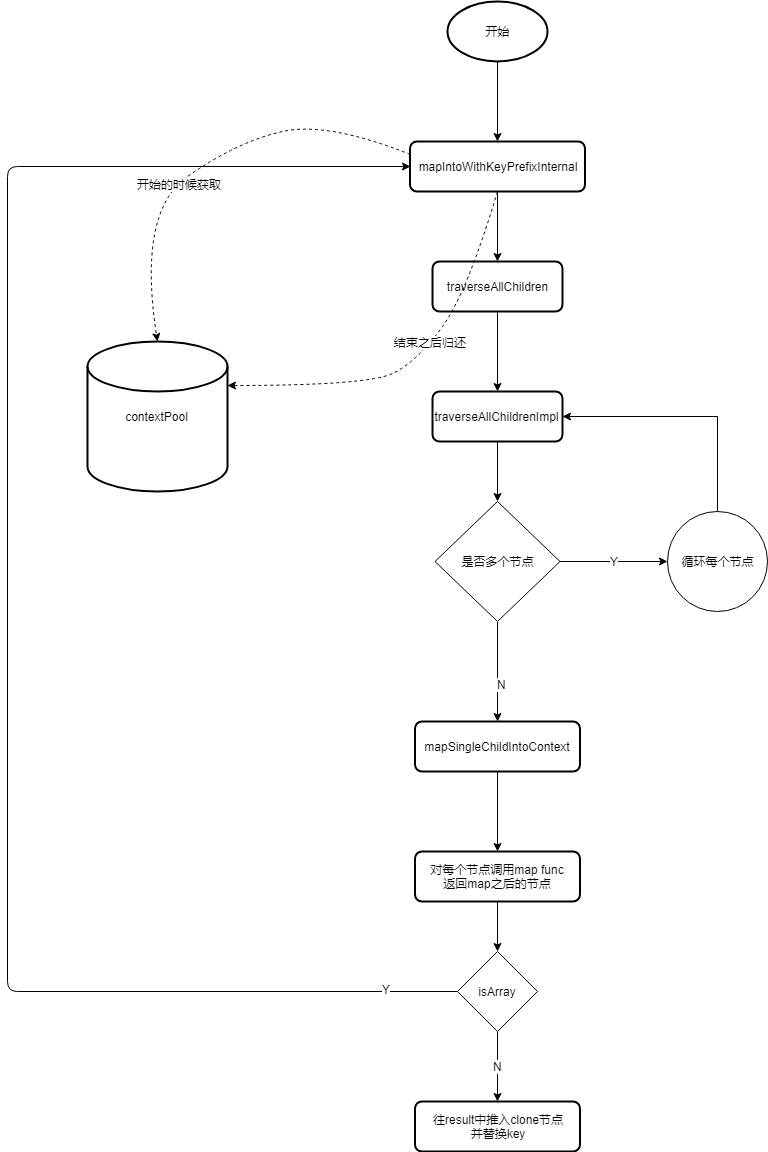
方法被定义在[react/packages/react/src/React.js]中
 Children: {
    map,
    forEach,
    count,
    toArray,
    only,
  },
我们先看一下简化的代码,大题有哪些方法:
function function getPooledTraverseContext(...){
    //...
}
function function escapeUserProvidedKey(...){
    //...
}
function function releaseTraverseContext(...){
    //...
}
function function traverseAllChildrenImpl(...){
    //...
}
function function  traverseAllChildren(...){
    //...
}
function function getComponentKey(...){
    //...
}
function function forEachSingleChild(...){
    //...
}
function function forEachChildren(...){
    //...
}
function function mapSingleChildIntoContext(...){
    //...
}
function function onlyChild(...){
    //...
}
function function toArray(...){
    //...
}
export {
  forEachChildren as forEach,
  mapChildren as map,
  countChildren as count,
  onlyChild as only,
  toArray,
};
contextPool
从上面的神图中,我们可以看到函数之间的作用,那么 contextPool 的作用什么
我们在流程图中可以看到,具体调用了 mapIntoWithKeyPrefixInternal 函数
function mapIntoWithKeyPrefixInternal(children, array, prefix, func, context) {
  let escapedPrefix = '';
  if (prefix != null) {
    escapedPrefix = escapeUserProvidedKey(prefix) + '/';
  }
  const traverseContext = getPooledTraverseContext(
    array,
    escapedPrefix,
    func,
    context,
  );
  traverseAllChildren(children, mapSingleChildIntoContext, traverseContext);
  releaseTraverseContext(traverseContext);
}
代码中又调用了两个方法,traverseAllChildren 和 releaseTraverseContext,我们具体看一下
function traverseAllChildren(children, callback, traverseContext) {
  if (children == null) {
    return 0;
  }

  return traverseAllChildrenImpl(children, '', callback, traverseContext);
}
function traverseAllChildrenImpl(
  children,
  nameSoFar, // name  每一层都会拼装
  callback,
  traverseContext,
) {
  const type = typeof children;

  if (type === 'undefined' || type === 'boolean') {
    // All of the above are perceived as null.
    children = null;
  }

  // invokeCallback=true才是可渲染的节点
  let invokeCallback = false;

  if (children === null) {
    invokeCallback = true;
  } else {
    switch (type) {
      case 'string':
      case 'number':
        invokeCallback = true;
        break;
      case 'object':
        switch (children.$$typeof) {
          case REACT_ELEMENT_TYPE:
          case REACT_PORTAL_TYPE:
            invokeCallback = true;
        }
    }
  }

  if (invokeCallback) {
    callback(
      traverseContext,
      children,
      // If it's the only child, treat the name as if it was wrapped in an array
      // so that it's consistent if the number of children grows.
      nameSoFar === '' ? SEPARATOR + getComponentKey(children, 0) : nameSoFar,
    );
    return 1;
  }

  let child;
  let nextName;
  let subtreeCount = 0; // Count of children found in the current subtree.
  const nextNamePrefix =
    nameSoFar === '' ? SEPARATOR : nameSoFar + SUBSEPARATOR;

  if (Array.isArray(children)) {
    for (let i = 0; i < children.length; i++) {
      child = children[i];
      nextName = nextNamePrefix + getComponentKey(child, i);
      subtreeCount += traverseAllChildrenImpl(
        child,
        nextName,
        callback,
        traverseContext,
      );
    }
  } else {
    // 不是数组,判断是否可以迭代
    const iteratorFn = getIteratorFn(children);
    if (typeof iteratorFn === 'function') {
      if (__DEV__) {
        // Warn about using Maps as children
        if (iteratorFn === children.entries) {
          warning(
            didWarnAboutMaps,
            'Using Maps as children is unsupported and will likely yield ' +
              'unexpected results. Convert it to a sequence/iterable of keyed ' +
              'ReactElements instead.',
          );
          didWarnAboutMaps = true;
        }
      }

      const iterator = iteratorFn.call(children);
      let step;
      let ii = 0;
      while (!(step = iterator.next()).done) {
        child = step.value;
        nextName = nextNamePrefix + getComponentKey(child, ii++);
        subtreeCount += traverseAllChildrenImpl(
          child,
          nextName,
          callback,
          traverseContext,
        );
      }
    } else if (type === 'object') {
      let addendum = '';
      if (__DEV__) {
        addendum =
          ' If you meant to render a collection of children, use an array ' +
          'instead.' +
          ReactDebugCurrentFrame.getStackAddendum();
      }
      const childrenString = '' + children;
      invariant(
        false,
        'Objects are not valid as a React child (found: %s).%s',
        childrenString === '[object Object]'
          ? 'object with keys {' + Object.keys(children).join(', ') + '}'
          : childrenString,
        addendum,
      );
    }
  }

  return subtreeCount;
}
function releaseTraverseContext(traverseContext) {
  traverseContext.result = null;
  traverseContext.keyPrefix = null;
  traverseContext.func = null;
  traverseContext.context = null;
  traverseContext.count = 0;
  if (traverseContextPool.length < POOL_SIZE) {
    traverseContextPool.push(traverseContext);
  }
}
traverseAllChildrenImpl 方法就不看了,此处省略一万字,里面具体做的就是循环子节点,然后对每个子节点调用 func,返回 map 后的节点,最后推入 clone 节点,并替换了 key
我们可以在 traverseAllChildrenImpl 里看到,如果 children 是数组,for 循环执行了 callback 函数,这里的 callback 就是上面子节点的 func,那么 func 从哪来的,我找了一下是 React.Children.forEach 方法处理子节点时调用的,里面做了子节点的属性挂载,比如 width、height、source 等。。。
const POOL_SIZE = 10;
const traverseContextPool = [];
// 维护一个对象最大为10的池子,从这个池子取到对象去赋值,用完了清空, 防止内存抖动
function getPooledTraverseContext(
  mapResult,
  keyPrefix,
  mapFunction,
  mapContext,
) {
  if (traverseContextPool.length) {
    const traverseContext = traverseContextPool.pop();
    traverseContext.result = mapResult;
    traverseContext.keyPrefix = keyPrefix;
    traverseContext.func = mapFunction;
    traverseContext.context = mapContext;
    traverseContext.count = 0;
    return traverseContext;
  } else {
    return {
      result: mapResult,
      keyPrefix: keyPrefix,
      func: mapFunction,
      context: mapContext,
      count: 0,
    };
  }
}
在 getPooledTraverseContext 函数中,维护一个 size 为 10 的缓冲池,将元素都存了起来,用的时候直接取,如果 traverseContextPool 小于 10,就将 traverseContext push 到 traverseContextPool 中,进行对象的复用,当使用完之后,releaseTraverseContext 又清空了这个对象,防止内存占用。
有关 React 如何 render 页面,请看下篇,React Filber。